Installing Sovereign Realms
DiscussFrom the Sovereign Realms Encyclopedia
Sovereign Realms is a free mod for Minecraft: Java Edition, built on the NeoForge mod loader. You install it once and can then play alone or join any server running the same version, including hosted ones. The mod is in alpha: expect rough edges, pauses, and economy balance that is still being tuned.
The version figures here are those of the release this encyclopedia describes. The site's download page always carries the current ones.
Requirements
| Requirement | Value |
|---|---|
| Minecraft | Java Edition 26.1.2 |
| Mod loader | NeoForge 26.1.2.30-beta |
| Java | Java 25 (the launcher profile includes it) |
| Client memory (multiplayer) | At least 6 GiB allocated to the game |
| Memory in single player, Greater World | 12 GiB allocated to the game is recommended, because your computer also runs the simulation |
| Server memory, Greater World | 12 GiB allocated to the server is recommended |
| Mod version | 0.3.8-greater.30 |
The mod is free under the Sovereign Realms License: you may play it, run servers with it, make videos of it and include it in CurseForge or Modrinth modpacks. Rehosting its files, changing it or reusing its content elsewhere needs permission.
Installing with a launcher profile
This is the easiest way. The profile is a Modrinth pack (a .mrpack file) that installs the right Minecraft, NeoForge and mod versions together. It works with Prism Launcher, the Modrinth App and other launchers that open .mrpack files.
- Install Prism Launcher or the Modrinth App.
- Download the profile from the site's download page and open it with the launcher.
- Sign in with your Microsoft account and press Play.
The profile also turns on the Pixel Perfection texture pack, which is what the pictures on this site show. You can switch it off under Options, Resource Packs.
Installing by hand
If you use the official Minecraft Launcher:
- Run the NeoForge installer for 26.1.2.30-beta and choose "Install client".
- Open the Minecraft Launcher once with the new NeoForge profile, then close the game.
- Put the mod's
.jarfile into themodsfolder of your game directory. - In the launcher, raise the profile's memory to at least 6 GiB (Installations, Edit, More options).
Joining a server
Add the server's address under Multiplayer in Minecraft. Client and server must run the same mod version: a client of 0.3.8-greater.18, for example, cannot join a server of 0.3.8-greater.19. If yours differs, you are told which version the server runs and which you have, with the download page to get the server's. A hosted server that is asleep wakes when you try to join; try again after about a minute (see Hosted Servers). If the server uses a whitelist, its owner must add your Minecraft name first.
Playing alone: world types
To play alone, create a new world and open the World Type choice. The mod adds five.
| World type | What it is |
|---|---|
| Sovereign Realms: The Known World, Greater | The complete authored world, 49,152 blocks across: the one this encyclopedia describes (see The Known World). |
| Sovereign Realms: The Known World | The first, smaller authored edition, 24,576 blocks across. |
| Sovereign Realms: Archipelagos | A generated world of island groups. |
| Sovereign Realms: Continents | A generated world of continents. |
| Sovereign Realms: Small Seas | A generated world of lands around small seas. |
Raising all the towns of the Greater World takes a few hours on a fast computer, which is why a hosted server, which comes with the world already raised, is quicker to start. Early in a world's life, towns you are far from may still be unbuilt; they appear as the world is raised.
The new-world screen
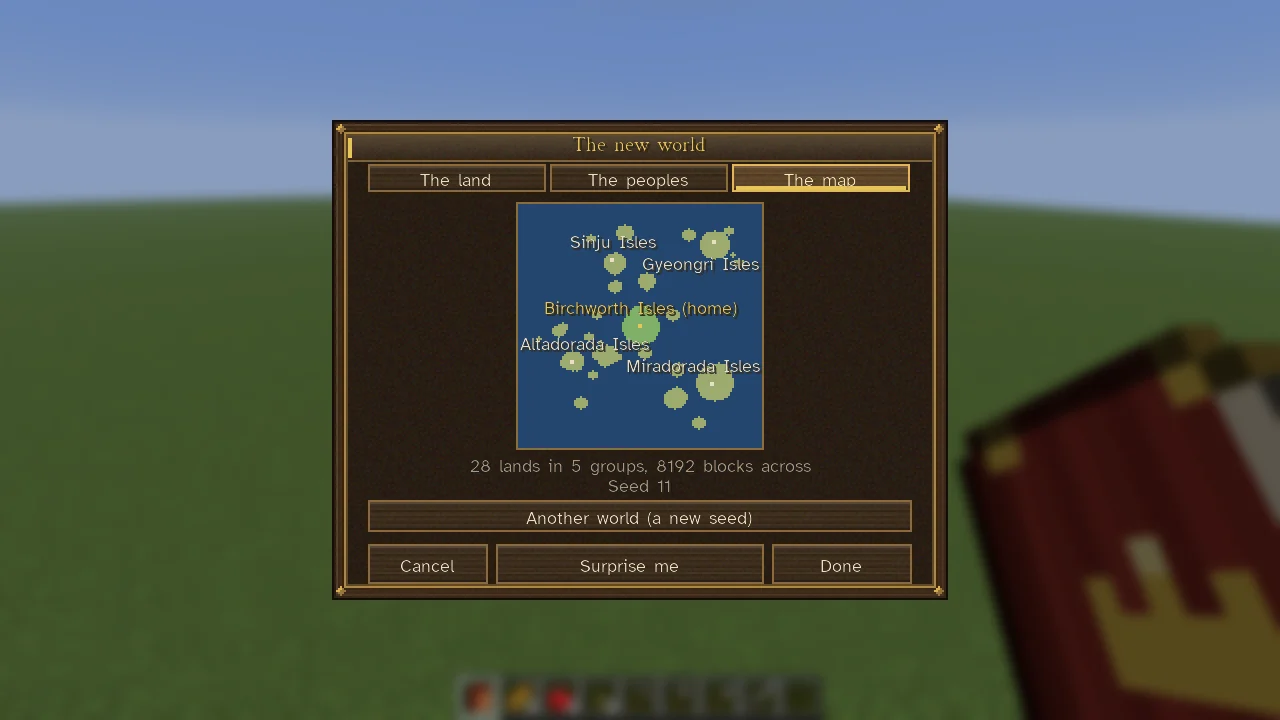
Choosing one of the generated types and pressing Customize opens the screen "The new world" with three pages, each of which can be left at its defaults.
- The land: Scarcity (Abundant, Balanced, Scarce or Harsh: how much ore lies outside deposits, how good the soil is and how fast what is taken grows back), Regrowth, World width, Lands (how many archipelagos or continents) and Other peoples (whether the far lands hold realms of other peoples).
- The peoples: how realms are arranged, how towns start and how thickly the land is peopled. It also offers a choice of what a death means: as in any game, a dynasty (you go on as your eldest grown child) or one life.
- The map: a preview of the lands, with Another world (a new seed).
Surprise me chooses everything by chance. See Resources and Scarcity for what scarcity does in play.
Running your own server
The client and the server use the same mod .jar.
- Install Java 25, then run the NeoForge installer and choose "Install server" in an empty folder.
- Put the mod
.jarin the server'smodsfolder. - Start it with the generated
run.bat(Windows) orrun.sh(Linux). Review and accept Minecraft's EULA if you agree, then start it again. - For the Greater World, give the server 12 GiB with
-Xmx12Ginuser_jvm_args.txt, leave memory for the operating system, and allow players to connect on your server port.
To use the premade geography and towns, set these before creating a new world:
- in
server.properties:level-type=sovereignrealms:tailored_greaterandmax-tick-time=-1(each town is built in one long step); - in
config/sovereignrealms-server.toml, under[simulation]:masterRaise = true(a town that cannot fit its ground is logged, and the rest go on).
Building all its towns takes a few hours. Back up an existing world before updating the mod, and keep the older build that matches it if you may need to go back. Release 0.3.8-greater.17 changed the save format, so a world saved by .17 or later must not be reopened with .16.
A server that is empty pauses a minute after the last player leaves and goes on where it stood when someone returns, unless its owner sets simulateWhenEmpty on; see Catch-up Simulation. The server's [counsel] section controls the optional language-model features; see Counsel and Language Models. Server-owner commands are listed under Commands.
After installing
Join a world and open the Companion in your pack; Getting Started walks through the first hour, and Controls and Key Bindings lists the key bindings.