Sheets
DiscussFrom the Sovereign Realms Encyclopedia
Sheets are how Sovereign Realms shows you things. Every person, building, company, town, the Command Table, your own page and the Companion opens as a sheet: a framed page with a title, tabs, headed sections, and buttons along the foot. A sheet shows first, then tells: its numbers, states and choices are drawn as tiles, meters, cards and chips that read at a glance, and the words that explain them wait on their hovers. The same few rules hold on every sheet, so once you can read one you can read all of them.
What opens a sheet
| To see | Do this |
|---|---|
| A person | Sneak with an empty hand (or hold a Realm Lens or a Steward's Seal) and right-click them from the front; sneaking up from behind reaches for their belt instead. A plain right-click starts a talk (see Talking with People). |
| A building | Right-click the building's marker block. See Buildings and Building Markers. |
| A town | Right-click its Town Heart. |
| Your own page | Press J, or type /you. |
| Your realm's table | Use a The Command Table, or type /realm desk. |
| The Companion | Right-click the book, or type /companion. See The Sovereign's Companion. |
| Your map | Press M. See Maps, the Corner Map and the Compass. |
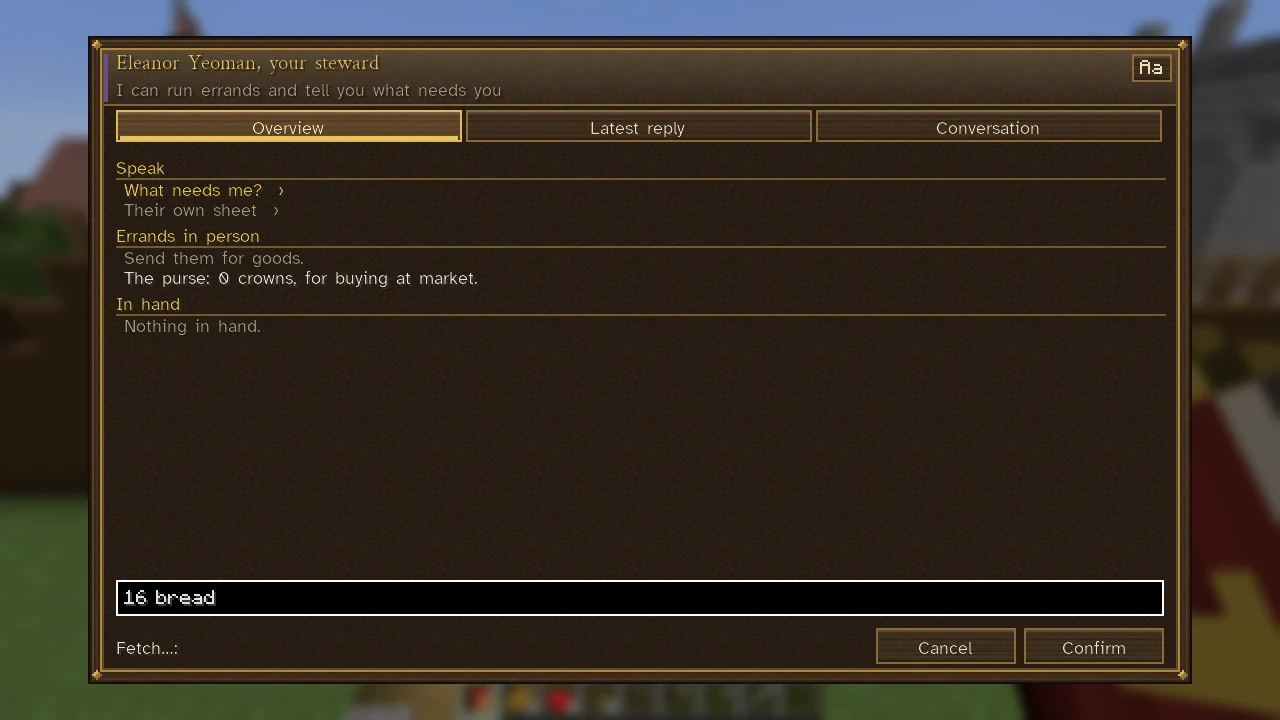
| Your steward | Press U. See Your Steward. |
| What you missed | /briefing; see Catch-up Simulation. |
Every sheet has the same frame. A colour strip at the left of the title shows whose it is (a realm's colour, for instance), and the subtitle says what kind of place or person this is.
Reading a sheet
Tabs
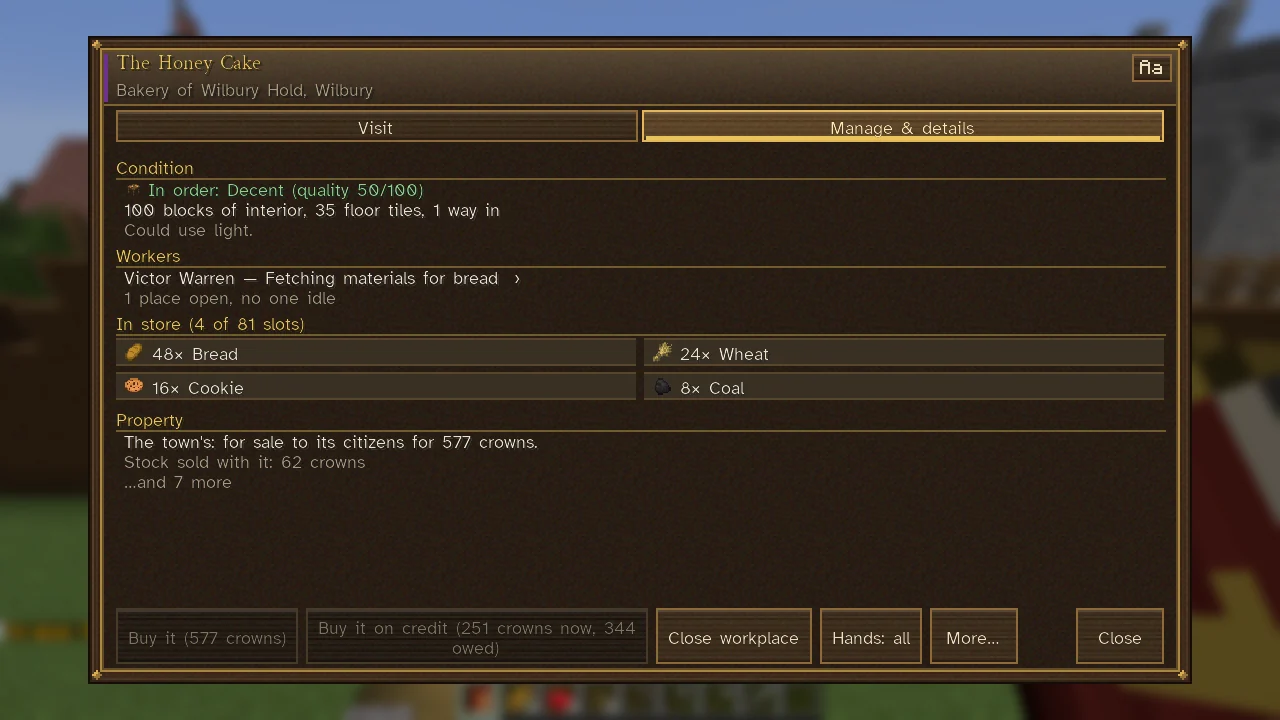
A row of buttons under the title chooses the page: your sheet has Who, Worth, Property, Renown, Ties, Politics, Crime, Health, Trades, Will and Journal; a living person of your own realm has Now and Life, and, for those your rank may look into (stewards and magistrates; a marshal for soldiers), also People and Memories; a building has Visit and Manage & details (Details, if it is not yours to manage); the Command Table has Realm, Attention, Rule, People and more (see The Command Table); how a realm is governed has Who rules, Who stands where, Offices, Laws and Relations (see Government and Law-making). The tab you are on is the lit one. Tabs whose names fit in one row stand in one row, each as wide as its name needs; more than that wrap into rows of buttons of one width.
The building blocks
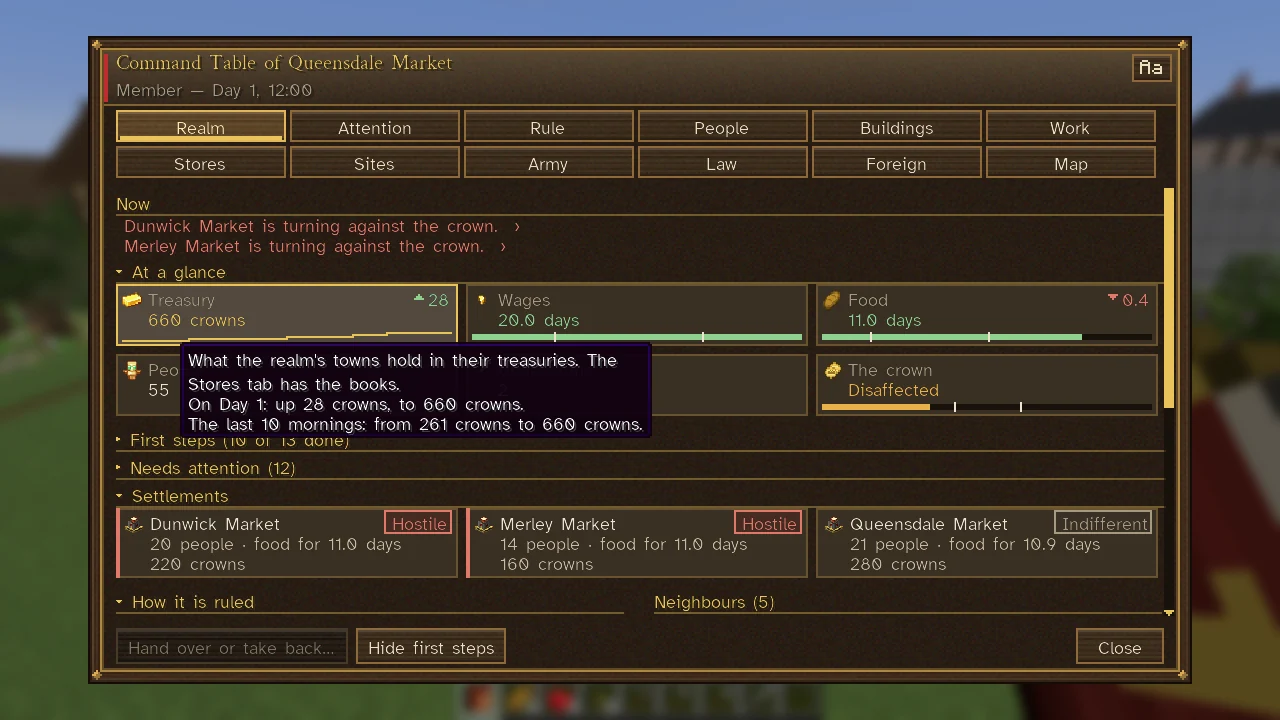
A sheet draws what it is about with a few kinds of block. Blocks of one kind stand side by side, as many to a row as the window holds.
| Block | What it shows | Where you meet it |
|---|---|---|
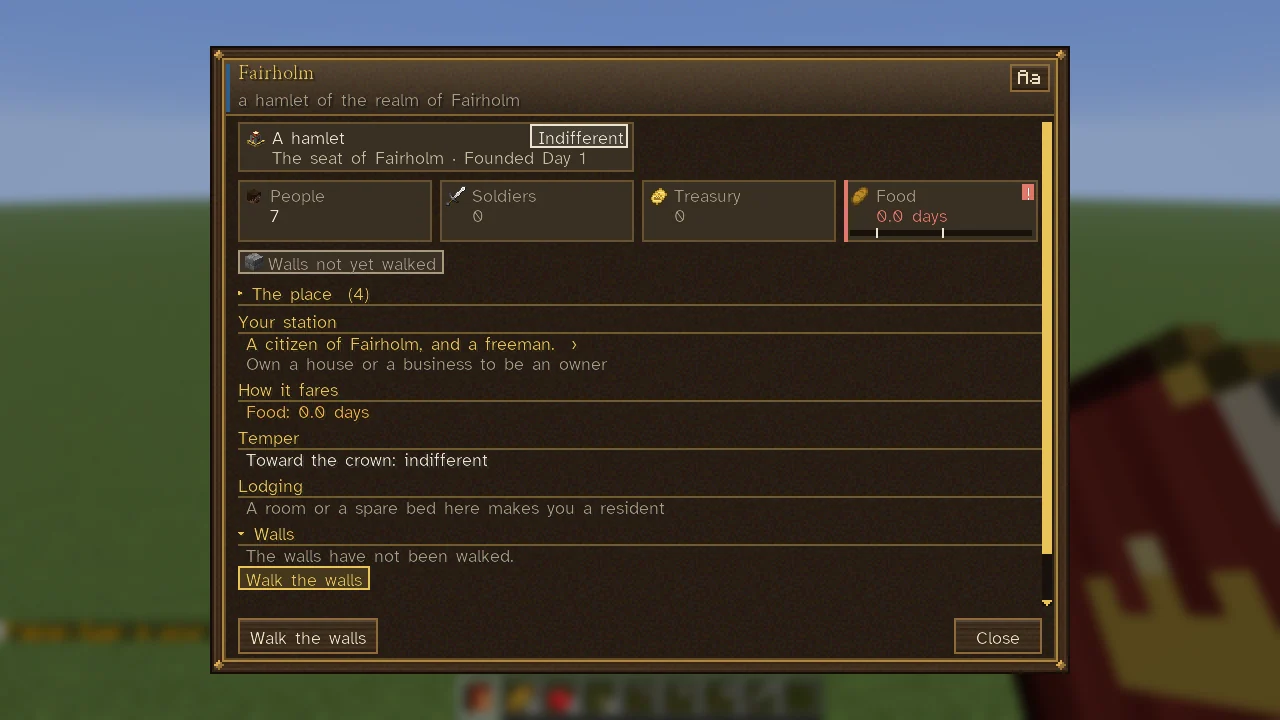
| Tile | A picture, a short label and one number or word in its colour. Beside the label, an arrow and how far the number moved since the morning before (green for the better, red for the worse). At its foot, a meter, or a line of its last days. | The row under At a glance at the head of a page: a realm's treasury, food, people and soldiers; a town's people and food; a person's mood and health. |
| Meter | A bar filled to its share, with a tick at each point where it turns (food at 2 and 7 days; stability at 30 and 50), and its number at the end. | Inside tiles and cards, and on their own: the realm's stability and legitimacy, a person's food, rest and company. |
| Card | A thing you can open or answer: its picture, its name, two or three facts in a row, and its state on a chip at the top right. At its foot it may have a meter and how far it moved, or a few meters a row each, or a small chart. | Towns, interests, alerts, laws, crafts, companies, buildings, roads, people (each with their own face). |
| Chip | A word on the ground of its colour, and a word more after it: a realm and its standing, a filter and its count, a choice and what it would do. | Neighbours, filters ("All 17", "Food 1"), feelings, the choices of a law. |
| Small chart | A bar a day on a dark ground, its thresholds dotted, the last day brightest. | The realm's stability over its last mornings; a trade's output over the last week. |
| Chart of places | Who stands under whom: a box for each, its name and a word more, joined by lines. One that fits its frame is a tree from the top down. One wider than its frame is laid tall: its head across the top and the rest in columns beneath, each a step in under the one it belongs to, every name whole and nothing to scroll sideways. Short of room, each place takes one line, its word more after its name and the whole on its hover; taller than its frame, it has a scroll bar. Each place opens its page. | A realm's offices (the Command Table's Rule tab, and Offices in how a realm is governed), the realms on the Foreign tab, who decides a law, a house's family tree, a crew. |
The colours mean the same everywhere: green is good, amber uneasy, red bad, gold the crown's own and what leads on, and a muted grey is a fact that needs nothing. Colour is never the only sign: a trend has its arrow, a chip its word, a meter its ticks. A card in trouble has its left edge in amber or red, and a tile in red has a red edge and a "!" at its corner. Where the window is wide, two sections that are read together stand side by side as columns (a demand granted beside it refused); in a narrow window the second stands under the first.
Sections and folding
The body is a list of sections, each with a gold heading. A section of more than a couple of rows can be folded. A heading marked with a small right-pointing arrow is shut, and a down-pointing one is open; click a heading to open or shut it. A shut section shows how many rows it holds, for example "Its people (3)".
A short sheet opens whole. A long sheet (well over a screen, with three or more sections) opens with its first section, and its second unless it is very long, open and the rest folded, so that what matters first is not buried. A section drawn as blocks (tiles, cards, meters, chips or a chart) always opens: it is the page's glance. A sheet only a little over a screen folds its last long sections until the rest fits. The game remembers which sections you left open or shut, sheet by sheet and tab by tab. Sections of a line or two never fold.
Rows and blocks that lead on
A row that ends in a small arrow (›) opens what it names: the person, building, company or page. A worker's name opens their sheet; "How it is governed" opens the town's government. A tile, card or chip that leads on lights with a gold edge under the mouse, and a click opens what it names: a tile the tab that has the rest, a town's card its page, a filter chip the view it names. An alert's card has its one action written under it in gold, and clicking the card does it. The Back button at the foot returns to the sheet you came from, and Close (or Esc) closes the sheet. Esc first backs out of any list, picker or typed-in box that is open.
Buttons
Buttons along the foot are the things you can do from this sheet. Two kinds matter:
- A button whose label ends in
…(for exampleMarks…,Policy…,Orders…,More…) opens a list of related actions. Hover a choice in the list to see what it means. - A plain button does one thing at once. A button that cannot be used now is greyed. Hover it to see why: the hover gives the reason (for example, that you already belong to a realm, or lack the fee).
What does not fit on the bar goes under More…, but a page's chief button (a shop's buy, a ruler's grant) always stays in sight. On a town's sheet and a building's visit, the actions also stand as gold chips under the section they belong to, such as Walk the walls under the walls; one that cannot be done now is a muted chip with the reason on its hover. Pressing a chip is pressing its button.
What came of your last action is told at the foot of the sheet. Grave choices, such as war, are asked twice. If an action needs a name or number, the sheet asks for it in a box and Enter sends it. What you have typed stays in the box, with its cursor and the keys, while a notice at the foot comes and goes, the sheet is sent again with fresh figures, or the window is resized; so do the words typed to filter a list. Moving the cursor with the arrow keys does not lose the box its keys either.
Hovering
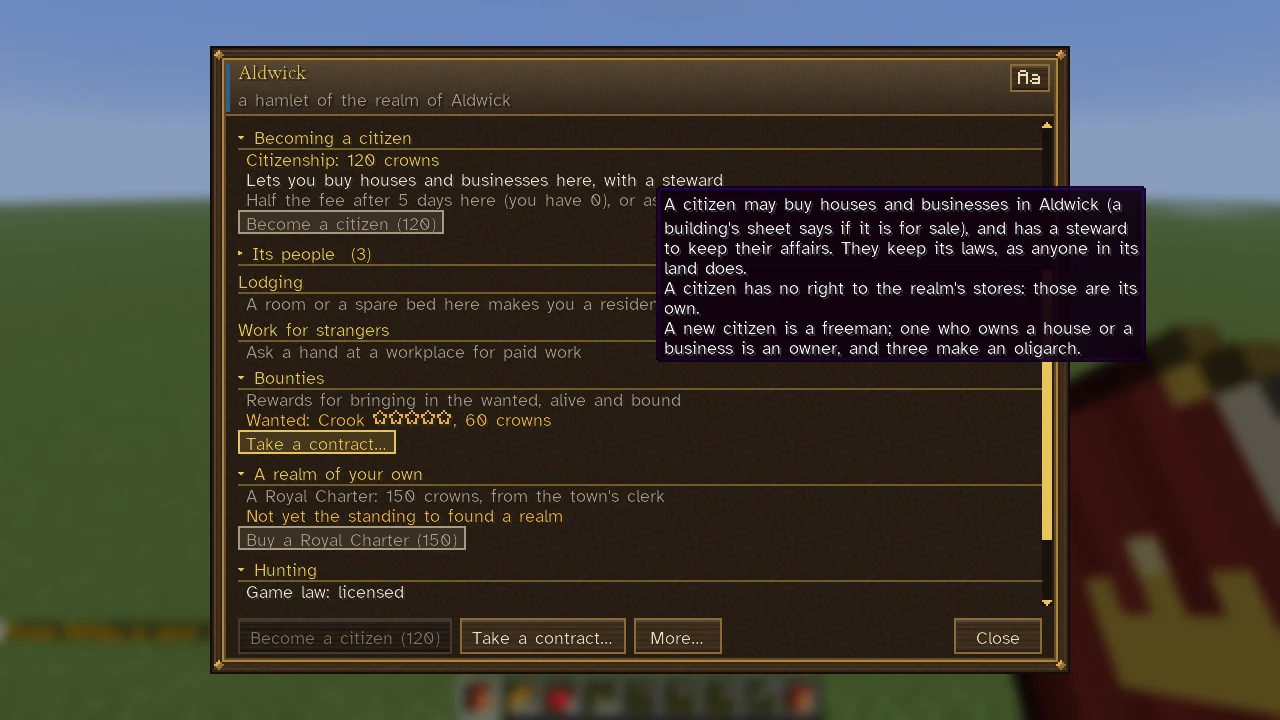
Rest the mouse on a row or a block for a moment and a box explains it: where a number comes from, what a feeling is made of, what an action costs, or what will happen if you press it. Words cut to fit a tile, card or chip are said whole at the head of its hover, and short rows keep their whole sentence for the hover. This is the main way the game explains itself, so when a row, a meter or a figure puzzles you, hover it.
Text size and typeface
The Aa button at the top right of any sheet changes its letters. It cycles through three: Clear (a sans-serif face made for easy reading, the default), Book (a book hand) and Minecraft's own. The button's hover tells you which is in use. For bigger letters everywhere, raise the GUI scale in Minecraft's video settings. The same choice is in Mods, Sovereign Realms, Config, under Fonts and compass.
The main sheets
Your sheet
Opened with J. It shows who you are as you live now (the name others know you by), with pages for your worth, property, renown, ties, politics, the law (Crime), health, trades, will and journal. It includes the number of stars you are wanted for in each realm, your charges and fines, and the price on your head. See Renown and Following, Wanted and Bounties, Hurts and Healing and Dynasties and Succession.
A person's sheet
Shows how they feel and why, what they are doing, what is stopping them, and whom they love or loathe. The Now tab opens on a card of the person now (what they are doing, what stops them, and what ails them most on a chip), then tiles for their mood and, once they have a view of you, how they regard you. To their own realm it shows more: their food, rest and company on meters in that card, a second card of their place (their work at its building and their station, their home as a chip after it), tiles for their health and, if grown, what they think of the crown, and their feelings as chips, green or red with how much each moves them. The Life tab has their character and what they carry. The People tab has their family tree and, for each tie, what it makes them likely to do. Along the foot, Talk, Give…, Ask for…, Praise and Rebuke stand out front; the rest are gathered by what they act on (Work, Law, Service, Family, Maps, Songs and Heart… for courtship). They remember all of it. See Townspeople and Courtship and Marriage.
A town's sheet
Opened at the Town Heart. It opens on a card of the town (how big it is, whose seat or town it is, and when it was founded, with its temper toward the crown on a chip, or for another realm's town where your realms stand), tiles for its people, soldiers, food and, to its own realm and realms allied or trading with it, its treasury, and its walls, great buildings and trades as chips. Further sections cover the place, how its realm stands with others (Relations, with Relations with every realm ›), your station, how the town fares, its temper toward the crown, lodging, walls and roads, each with its actions as chips under it. A stranger sees Becoming a citizen, Work for strangers, and A realm of your own with the price of a Royal Charter. Rulers see the town from above (See it from above, see The City View) and walk its walls. See Towns and Citizenship and Ranks.
A building's sheet
The Visit tab is for what a visitor can do there: it opens on a card of the building (its kind, what it is for, who owns or keeps it, and its state on a chip: Open, Closed, Unstaffed or Not ready, or for a home Lived in or Empty), with what can be done there as chips under the service it belongs to. Manage & details shows the building's condition (a quality score and what it could use, such as light), its workers, what is in store, and whether it is for sale and to whom, with the price and how its price is reckoned on hover. Broken blocks are shown here, and you may order the repair. See Buildings and Construction.
The Command Table
A realm's whole business, a tab for each part: what needs attention, the rule and its interests, people, buildings, work, stores, building sites, soldiers, learning, law, factions, foreign affairs and the chronicle, with a map coloured by whose influence holds the land. Rows and blocks lead on to the sheets they name. See The Command Table.
Commands and keys
Many sheets also have a command (see Commands) and a few have a key (see Controls and Key Bindings). Neither is needed: the Companion's Start tab links to the main ones.
See also
Getting Started, The Sovereign's Companion, Maps, the Corner Map and the Compass.