Battlefield Orders
DiscussFrom the Sovereign Realms Encyclopedia
Battlefield orders let a commander give orders to part of an army at once, in the field, with the keyboard. You select a group of the soldiers under your command (everyone, the infantry, the ranged or the cavalry) and give that group alone an order: where to move, how to stand, and when to shoot. They are meant to feel like the order keys of a mounted-warfare game: Backspace opens a two-level order menu, a battle panel at the left edge of the screen shows each group at a glance, and the soldiers you have selected carry a mark in their group's colour. The orders are the companies' own, and what each soldier does is real.
Whom the keys command
The keys act on the companies that answer to you: the one you lead as captain, those following you, and the one taken by the Command Horn in your hand, as long as they are in your world and within earshot (128 blocks). Someone who commands no company is told "No soldiers answer to you here." Soldiers are grouped by what they fight with:
- Cavalry: anyone who rides to the fight (light horse, knights, dragoons);
- Ranged: bows, crossbows, firearms and the like;
- Infantry: everyone else.
Your selection stays until you change it (everyone, at first), and every order goes to the selected group only, from a key or from the menu. The action bar names the group and the order ("Cavalry: form a wedge!"). Soldiers whose Morale has fallen below 35 may refuse; the action bar keeps the order, and the chat names who refused ("Tom Hale and 2 others refuse the order (morale shaken).").
The battle panel
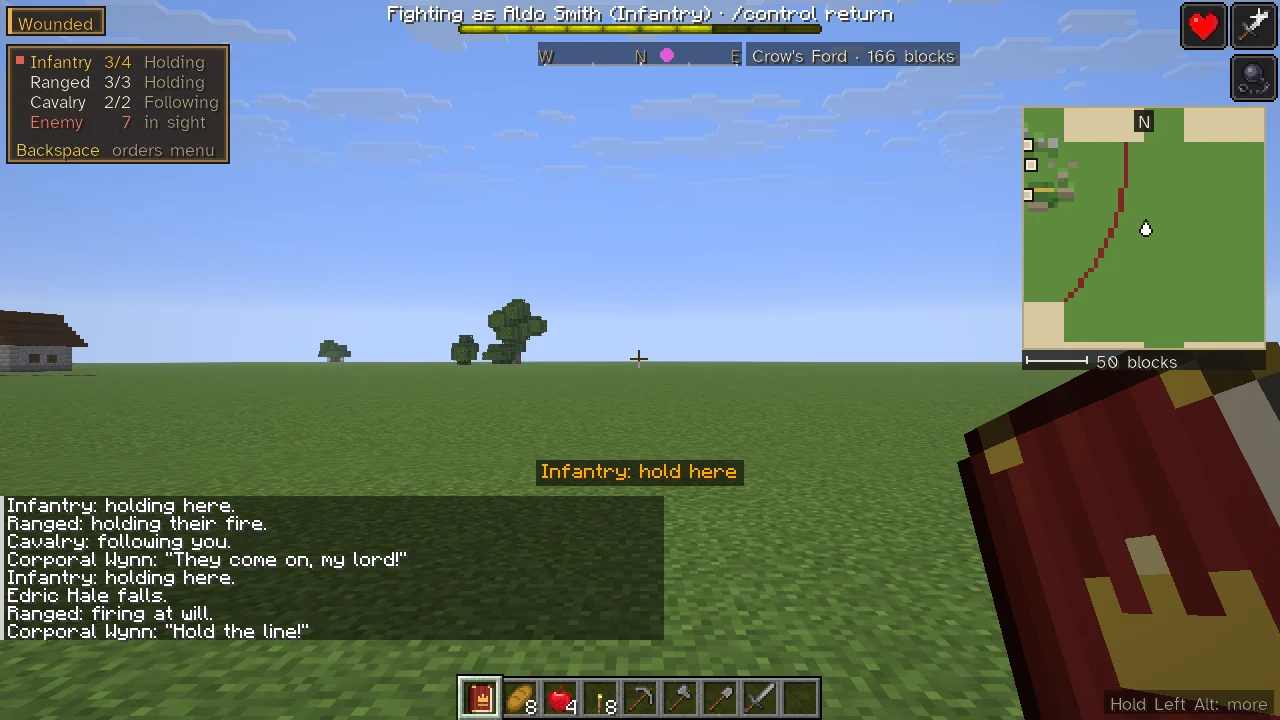
While you command in the field (you hold the horn, a company of yours is following you, an enemy is within 48 blocks of you, or you gave an order in the last half minute), a panel stands at the left edge of the screen:
- a line for each group you have soldiers in: its name, how many of it are on their feet of how many it has ("Infantry 3/4", in amber when some are down), and what most of it is doing: Holding, Following, Escorting, Charging, Garrison, Patrolling, Marching, Storming, Razing or Recalled;
- the selected group's name in gold, with a small square in its colour (with everyone selected, every group's);
- Enemy: how many enemies within 48 blocks you can see, in red while there are any;
- the key that opens the orders menu.
Holding Left Alt, the key that spells out the screen's edges in full, lists the panel and the order keys.
The order menu
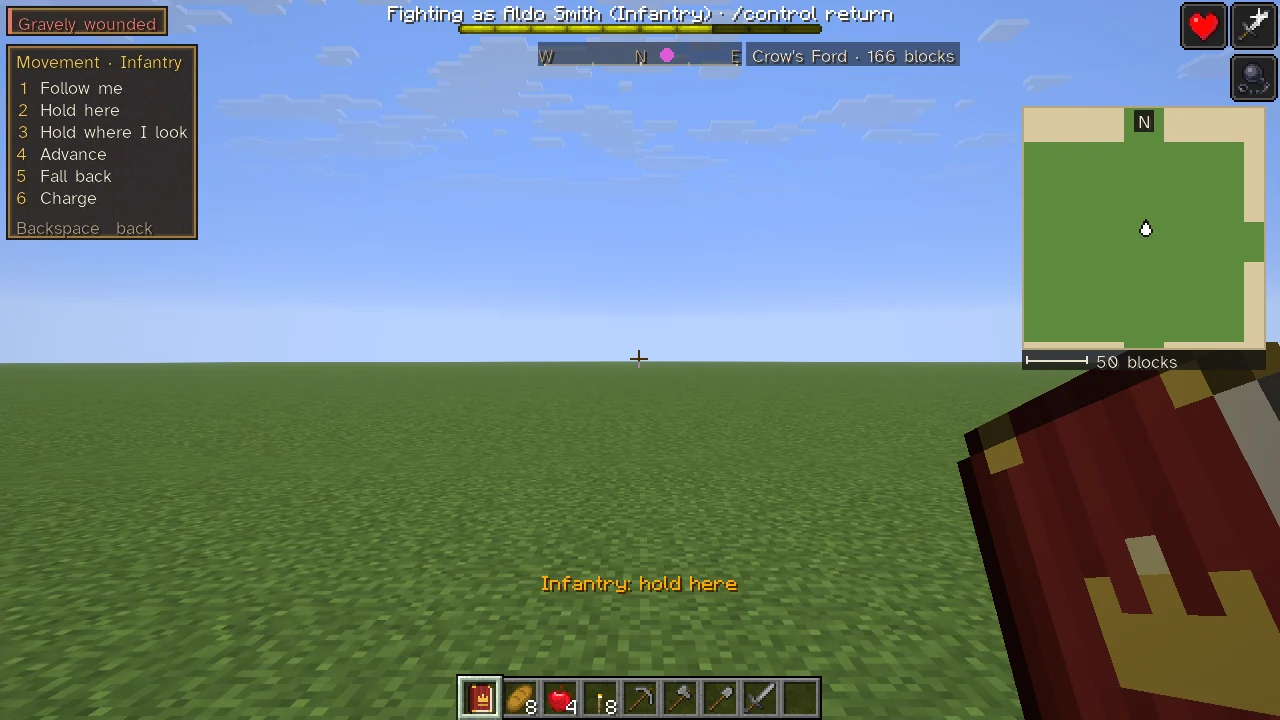
Backspace opens the order menu where the panel stands. While it is open, the number keys along the top of the keyboard are the menu's, not the hotbar's, and the chat steps aside. Its first page, Orders, lists the groups by number, each with its soldiers standing of its number and the selected one lit, then three pages:
| Key | First page |
|---|---|
| 1, 2, 3, 4 | Select Everyone, Infantry, Ranged, Cavalry (the menu stays open) |
| 5 | Movement › |
| 6 | Formation › |
| 7 | Fire › |
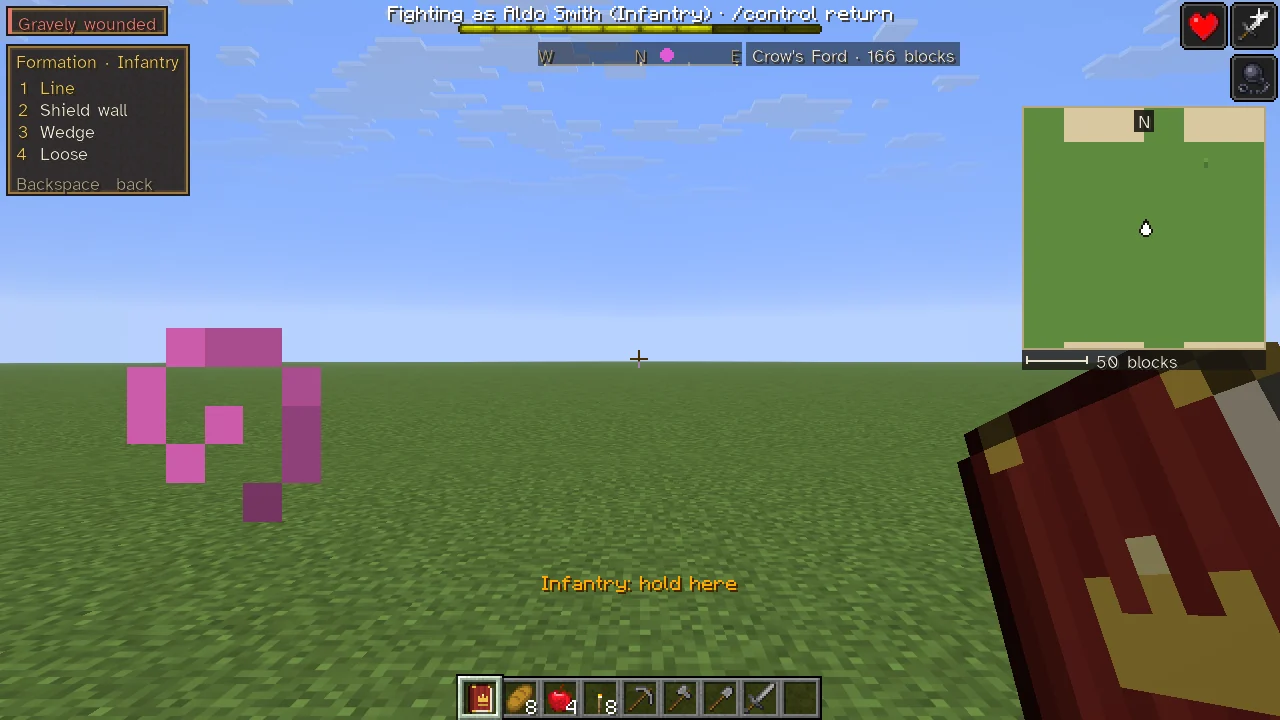
Each page is headed with its name and the group its orders go to ("Movement · Infantry"), and numbers its orders from 1:
| Page | Its orders |
|---|---|
| Movement | 1 Follow me, 2 Hold here, 3 Hold where I look, 4 Advance, 5 Fall back, 6 Charge |
| Formation | 1 Line, 2 Shield wall, 3 Wedge, 4 Loose |
| Fire | 1 Fire at will, 2 Hold fire, 3 Give fire |
So Backspace, 4, 6, 3 puts the cavalry in a wedge. Giving an order closes the menu, so the fight can be seen. On a page, Backspace goes back to the first page; on the first page it closes the menu. The menu also closes itself after about ten quiet seconds, or when another screen opens. On the Formation and Fire pages the way the selected group stands and fires now is lit in gold, and Give fire is dimmed while the group fires at will.
The keys
Every key can be rebound, under Sovereign Realms: battlefield orders in the controls (see Controls and Key Bindings). The defaults:
| Key | Order |
|---|---|
| Numpad 1, 2, 3, 4 | Select everyone, the infantry, the ranged, the cavalry |
| B | Next group |
| F6 | Follow me |
| F7 | Hold here |
| F8 | Charge |
| F9 | Hold fire / fire at will (the same key turns it back) |
| F10 | Form a line / spread out (the same key turns it back) |
| Backspace | The order menu |
| (none) | Hold where I look, Advance ten paces, Fall back ten paces: unbound until you bind them |
What each order does
- Follow me. The group falls in behind you. The others of its companies stand where they are, for a day.
- Hold here. With everyone selected, each company holds the place where you stand, drawn up as it is and facing the way you face. A smaller group stands in its own formation across the way you face, a step and a half behind you.
- Hold where I look. The same, at the ground you are looking at, up to 64 blocks away. Looking at no ground, you are told "Look at the ground where they are to hold, within 64 blocks."
- Advance and Fall back. The group's line (with everyone selected, each company's place) moves ten blocks forward or back along the way you face, and holds there facing it.
- Charge. The group turns aggressive and falls on the nearest enemy within 48 blocks of you, while the others of its companies stand where they are. With no enemy in sight it goes at any who come, and follows you if it was garrisoned or on patrol. A company at a town's walls with its war band storms the walls instead ("storm the walls!"), and the panel reads Storming (see Walls and Sieges).
- Fire at will and Hold fire. The group's bows and shot fire when loaded and in reach, or hold for the word.
- Give fire. The group, holding its fire, looses together in a volley. To a group that fires at will, the answer is "they fire at will already." The horn raised to the sky, and Give fire! on the company's sheet, give the word to the whole company.
- Line, Shield wall, Wedge, Loose. Draws the group up so (below). A group holding a line of its own is drawn up anew where it stands, facing the same way.
Formation and fire are kept for each group of each company, and saved with it: the horse may stand in a wedge while the foot form a shield wall and the archers hold their fire. The choices on a company's sheet set the whole company at once.
Marks over the selected
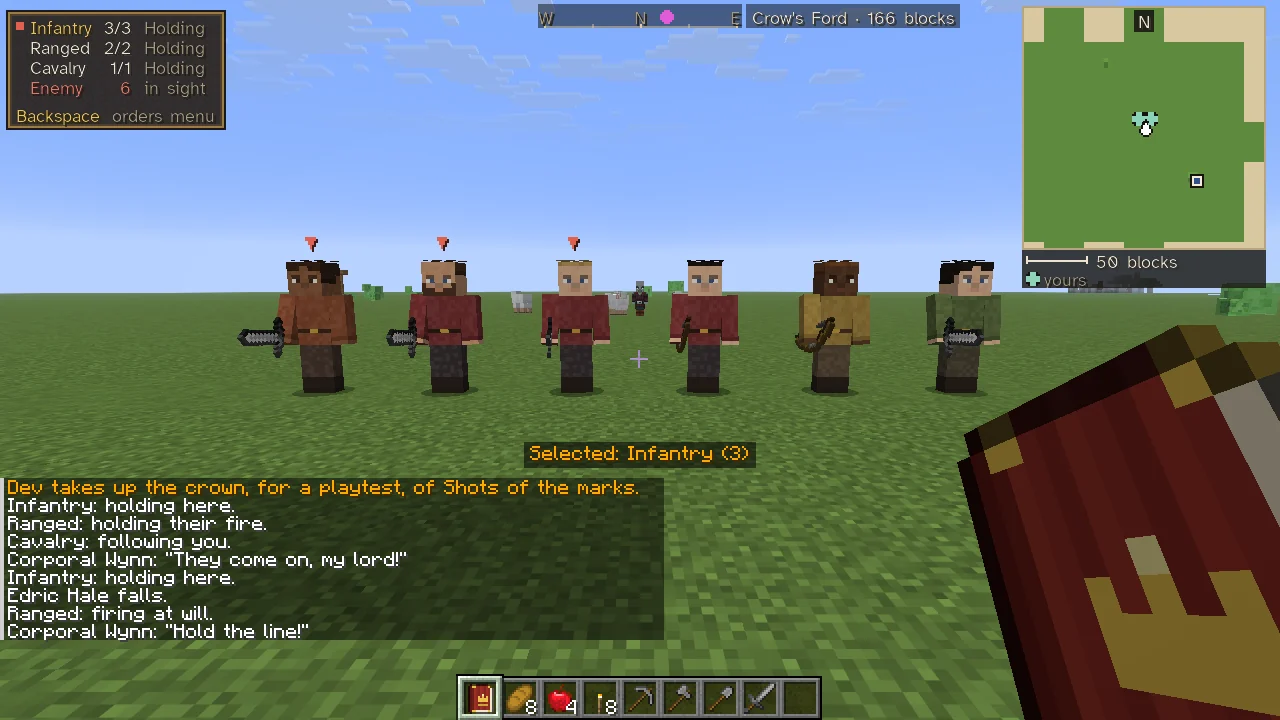
Over the head of each selected soldier within 64 blocks of you stands a small arrow in their group's colour: red for the infantry, green for the ranged, blue for the cavalry. Only their commander sees the marks, faint through whatever stands between, so a line can be found in a crowd. With everyone selected, each soldier carries their own group's mark.
How a company is drawn up
A company holding a place stands by type: pikes and halberds in the front rank, the rest of the foot behind them, archers and shot behind the foot, horse on the flanks, engineers at the rear. It faces the way its commander faced when the order was given in the field, or else the way from its home toward the place. A company's sheet chooses one of four arrays, and each group may have its own:
| Array | What it means |
|---|---|
| In line (Line on the menu) | Pikes and polearms in front, the rest of the foot behind them, shot behind the foot, horse on the flanks |
| Shield wall | The foot shoulder to shoulder in two ranks, shields locked: arrows and shot do less to them |
| Wedge | The foot in a wedge behind the captain at its point, for a charge; shot behind, horse on the flanks behind |
| Skirmish order (Loose on the menu) | Spread out, twice the room each: harder to hit all at once, but no line to hold |
A group holding a line of its own stands in a rank with about a block and a half from one soldier to the next (two and a half between horsemen), a shield wall in two close ranks, a wedge back from a point in two arms, and loose at twice the room.
Posture and shot
A company's posture decides how far it will go to fight:
| Posture | Engages | Meaning |
|---|---|---|
| Aggressive | Within 24 blocks | Engage any enemy in sight |
| Defensive | Within 12 blocks | Engage enemies who come close or strike first |
| Hold fire | Never first | Only fight back when attacked |
The company's page also offers Return to garrison, Hold where I stand, Escort me, Give fire!, Cease bombarding and Campaign…; those that do not fit on its bar are under More….
Battles in the field
Where someone is near, a battle is fought in the world. Each realm's soldiers in the field (a host on the road, or a company out on a field order) stand in bodies near the players only up to a number a side, sixty by default: a server setting, fieldBodiesPerSide in the simulation section, from 4 to 150. The default of sixty keeps the server at full speed in a clash of 150 a side. Those given bodies are a fair mix of the side's foot, bows and horse. The rest are the host's reserves, marching with it unseen. Every five seconds of a fight the two sides' reserves fight by share: about three in a hundred of them fall, split by how the two sides weigh against each other, half killed and half taken where the other side has a cell, as dead or as captive as any. As a side's bodies fall, its reserves step in, up to three a second, out of every player's view behind their host, and walk up; no body anyone can see is taken away.
A company you lead, as its captain or following you, that closes with a host of a realm you are at war with (at least three a side, within 48 blocks) fights a field battle. It is judged when one side breaks, with a quarter or fewer of those it closed with still on their feet against twice as many. A beaten host turns for home, and the war score and both realms' chronicles have the battle. Your realm hears the verdict in a short line, "Victory: company broke the host of realm." or "Defeat: the host of realm broke company.", the whole account on its hover, then, where reserves fought, "Beyond sight: n of theirs and m of ours fell." The company's page and the Army page keep the outcome as its last word. Winners gain heart and the beaten lose it (see Morale); of the beaten left lying on the field, some die of their wounds over the next minute unless someone helps them up (see Down, Not Dead).
Standing orders on the Army tab
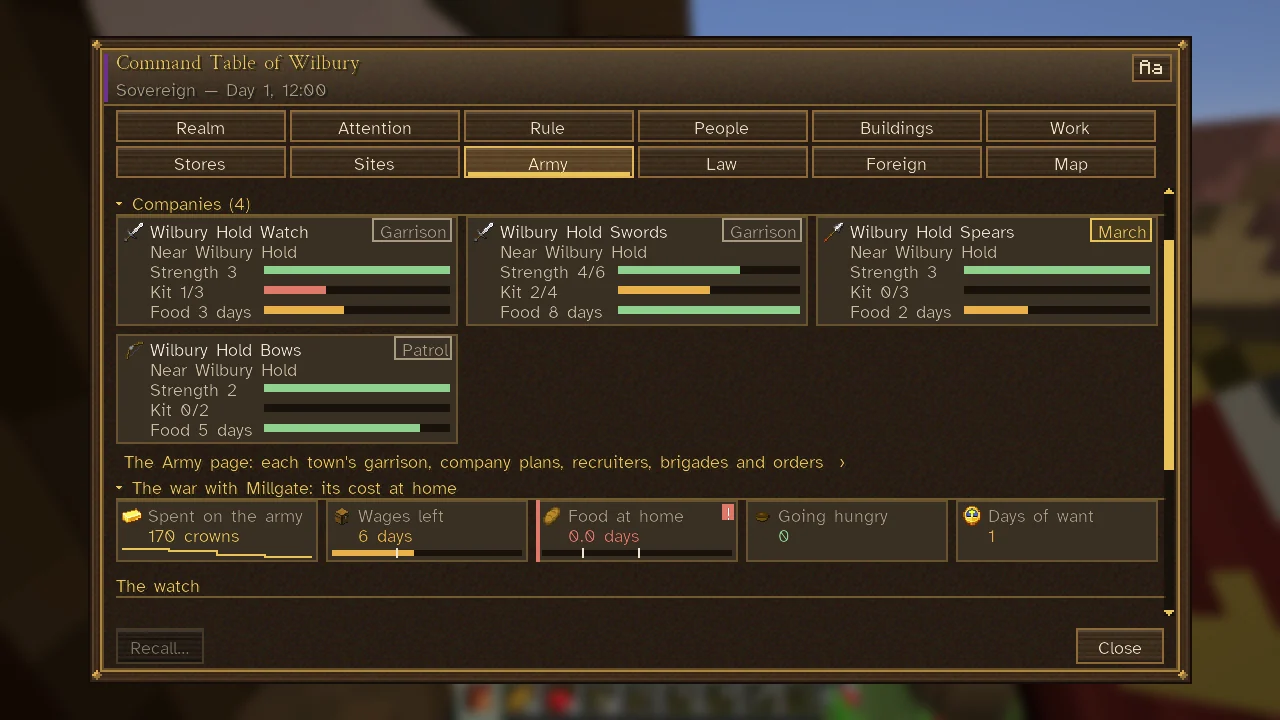
On the The Command Table's Army tab each company is a card whose chip names its standing order: Garrison, Patrol, Hold, Escort, March or Raze, the last two in gold and Garrison and Patrol muted. The card says where the company is ("Near…" while its soldiers are about, else "At home in…", "Patrolling…", "Holding by…", "Escorting", "Bound for…" or "On the march"), and its hover says who gave the order and when, and how it is going. See Armies and Soldiers.
See also
Armies and Soldiers for troop types and companies; Command Horn for orders by pointing; Campaigns for sending a company against an enemy town; Controls and Key Bindings for every key.