The City View
DiscussFrom the Sovereign Realms Encyclopedia
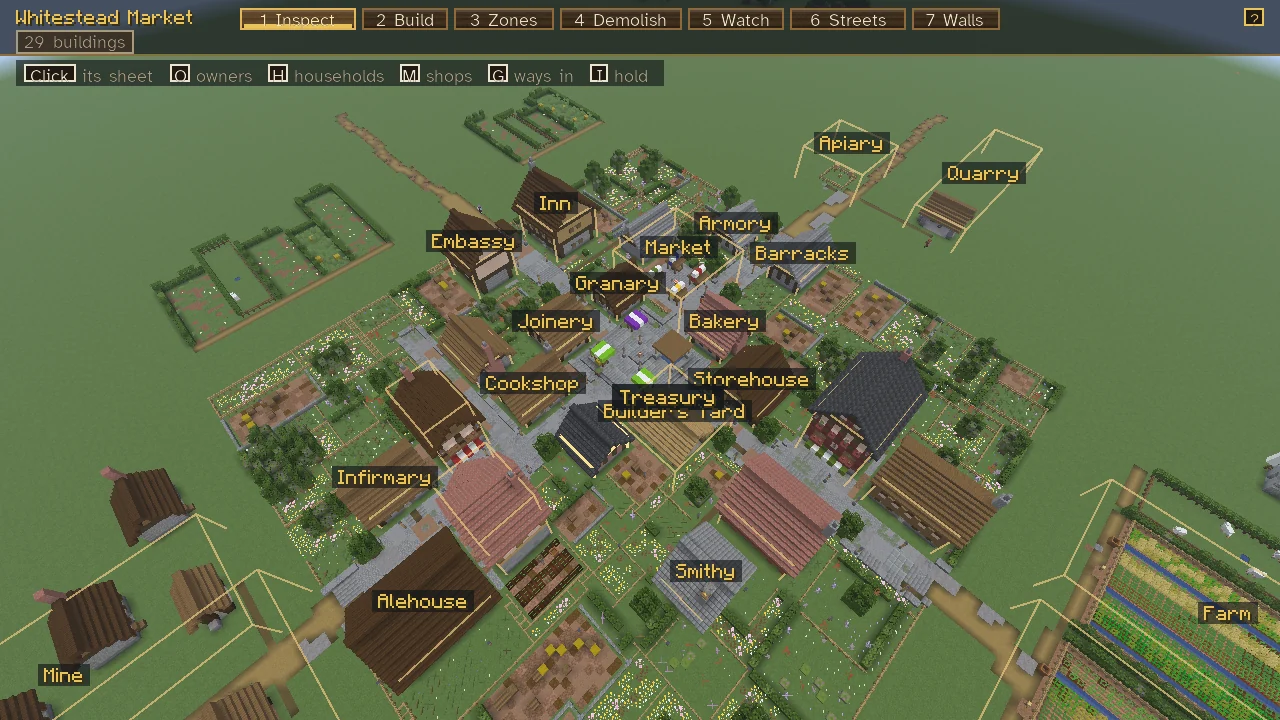
The city view shows one of your realm's towns from above, as its ruler sees it on the plan in the town hall. It is the realm's building editor: from here you can read any building's sheet, have a plan built, mark a farm's fields, pull a house down, set the watch's rounds, lay out streets and peg a wall. Each order is sent as it would be on foot and checked the same way, with one easing: from the view, a ruler need only stand in the town, not beside the site.
Opening it
Stand in one of your realm's towns, within 96 blocks of its Town Heart, and press V (the key can be rebound in the controls; see Controls and Key Bindings). Or use the Town Heart and press See it from above (the city view) on its sheet. The view opens on the heart.
It shows only a town of your own realm, and only to those who rule the realm: a plain citizen is told that "That is for those who rule..." and is pointed to the Town Heart instead. Another realm's town is never shown, since it would give away its walls and posts. A blow, or the body moving, closes the view: being attacked is not safe to ignore.
The bar
The bar across the top answers how the town is and what you can do from here:
- The town's name, and the seven modes as tabs, numbered 1 to 7. Where the screen is too narrow for their names, each tab shows only its number, the chosen one whole, and its name and what it does are on its hover.
- The town's counts as chips under its name: its buildings always, then only where there are any those not in order, its sites, those slated to come down, and its households hungry, crowded, idle or empty, each in its overlay's colour. Hover a chip for what it counts; click a household count to show the households overlay.
- The overlay's key, at the bar's right while an overlay is shown in Inspect: a swatch and a word for each colour it draws, what each means on its hover.
- The mode's keys, in a strip under the bar: each key and what it does ("P plan", "R turn", "Click lay out"), the overlay shown lit; their hover gives the mode's whole hint.
- A "?" at the bar's right end, whose hover tells how to move the view.
The server's word on what you are doing (a plan's ground and bill, a street's, a refusal) appears for a while under the mode's keys.
Moving about
- Drag, or press W A S D (or the arrow keys), to move the camera.
- The mouse wheel goes nearer and farther.
- Q and E turn the view a quarter turn.
- Tab looks straight down, and again to go back.
- L hides or shows the buildings' names, which are shown greatest first, as many as fit.
- Esc closes a panel, then leaves a mode for Inspect, then closes the view.
The modes are along the top; press 1 to 7 to choose one.
The modes
| Key | Mode | What it does |
|---|---|---|
| 1 | Inspect | The building under the cursor is outlined and named; a click opens its sheet (or a person's) in a panel at the side while the camera moves on |
| 2 | Build | Lay out a plan: P chooses it, R turns it, a click lays it out |
| 3 | Zones | Click a building with a work area (a farm, pasture, camp or pit), then drag across the ground to mark its area |
| 4 | Demolish | Click a building twice to slate it for taking down; click one that is slated to take the slating back |
| 5 | Watch | The town's posts and patrol routes; set the watch's rounds |
| 6 | Streets | Lay a path, a lane or a street from where you click to where you click next |
| 7 | Walls | Peg the corners of a wall, a click each, and lay it out from the sheet at the side |
Inspect
Inspect also has overlays on the ground, chosen by key. The one shown is lit in the strip of keys, and its key of colours stands at the bar's right:
| Key | Overlay | Its key |
|---|---|---|
| O | Owners | the town's (gold), a townsperson's (blue), a player's (violet) |
| H | Households | well (green), hungry (orange), crowded: more people than beds (red), idle: someone without work (blue), empty (grey) |
| M | Shops | stocked (teal) where stalls and shelves hold goods, bare (red); hover a shop for what it holds and the price |
| G | Ways in | doors (green) of every building, gates (gold) of the walls |
| I | The realm's hold | frontier (orange) where it is thin, wilderness (red) beyond it, another's (violet) where another realm's is stronger (Influence) |
Build
Press P to open the planner (the same as the Architect's Plans) and choose a plan with Choose this plan; the view returns with the plan outlined where the cursor rests. When the cursor has rested a moment the server says, under the mode's keys, whether the ground will take it and what it will cost: "The ground will take it. Its materials are worth about 131 crowns (from your stores), and its raising about 6 builders' days (42 crowns of wages)." A click lays it out; your builders do the rest (Construction). Great Buildings follow their own rules (Great Works). You need a rank that may order construction.
Zones and Demolish
In Zones, a click on a farm, pasture or camp chooses it and a drag across the ground sets its area; the same rules apply as for Surveyor's Stakes. In Demolish, a first click slates a standing, walled building for taking down, and a second confirms; its goods go to the stores and its people are housed elsewhere first, and a great work is never slated (Buildings).
Watch
The Watch mode draws the town's posts (green if kept this shift, red if not, the ruler's own marked), the routes its patrols walk, the route its ruler set, and the dark places where the view looks (a light level under 8) in red. A click adds a place to the ruler's patrol route, a right click takes the last off, C gives the route back to the watch, P sets a post where the cursor is and X takes one away. Setting the watch needs a rank that commands the military (The Watch and Watchtowers).
Streets
A click where a street should start and another where it runs to lays it out a stretch at a time, each stretch picking up from the last; it is outlined from the start to the cursor with the server's word and its bill. K chooses what is laid: a path (one block wide, of beaten earth and gravel), a lane (three wide, of cobbles) or a street (five wide, of the town's paving). A right click starts afresh. Your builders lay it from the stores; the longest stretch drawn at once is 128 blocks.
Walls
Click to peg a corner, the first again to close the ring; right-click takes up the last corner and R closes or opens the ring. The line is drawn on the ground, and its sheet at the side chooses its kind and works, tells what it will take and lays it out, as the Mason's Line does on foot (Walls and Fortifications).
See also
- Towns and Buildings
- Construction and Roads
- The Command Table: the realm-wide view of buildings, sites and the map.
- Sheets: how the panels at the side work.