Construction
DiscussFrom the Sovereign Realms Encyclopedia
Construction is how a realm gets buildings without placing every block itself. A ruler chooses a blueprint, a site is staked out on the ground, and the town's builders clear it, fetch every block from the realm's stores and lay it by hand, from the bottom to the top. When the last block is placed the building is recognised like any other (see Buildings). You can still build anything yourself, block by block, and declare it with a marker; construction is for when you would rather your people did it.
Ordering a site
- Craft and hold the Architect's Plans and use them on the ground where the building's front door should be. The planner opens, facing the way you were looking.
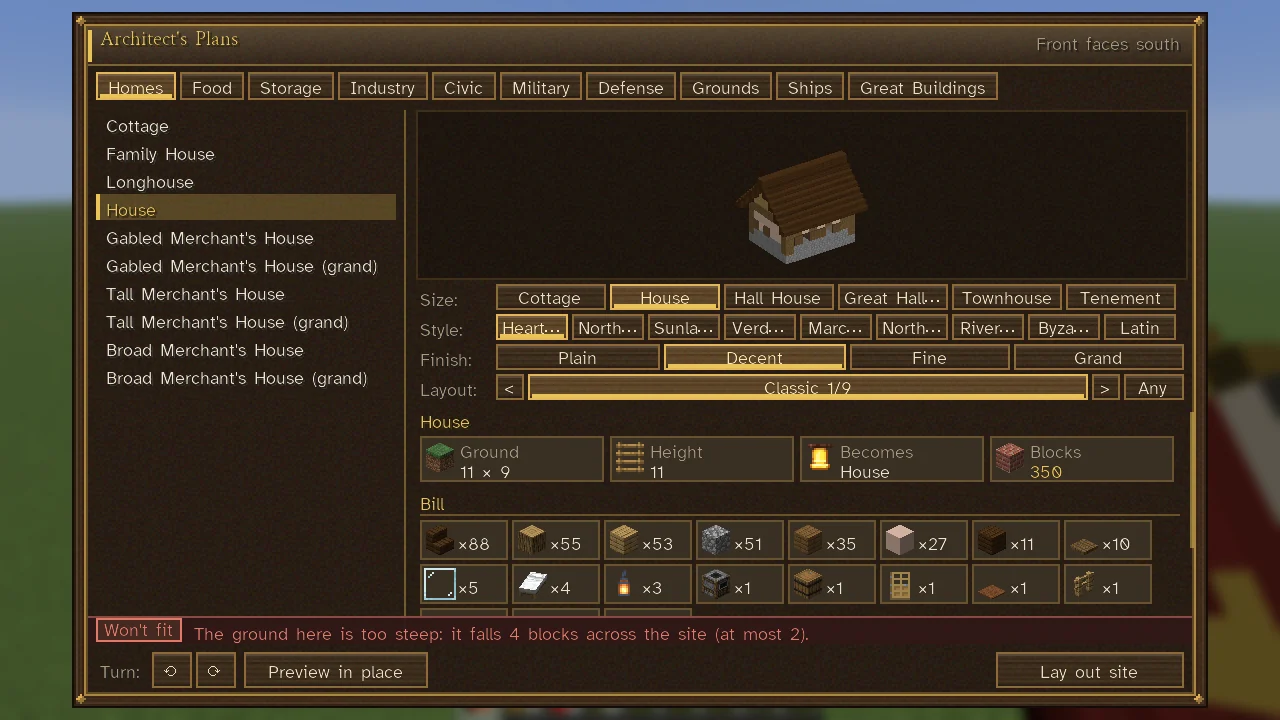
- Pick a tab (Homes, Food, Storage, Industry, Civic, Military, Defense, Grounds, Ships, Great Buildings), then a plan. Under its picture, tiles give the ground it covers, its height, what it Becomes (for a building) and how many Blocks it takes, and its Bill follows as a grid of cells, a picture and a count for each material (hover a cell for where it comes from).
- Turn it with the two arrows beside Turn:. Preview in place draws the plan pale and see-through where it would stand; the planner's foot then says on a chip whether the ground will take it (Ground fits in green, Won't fit in red), with the reason and the bill beside it.
- Lay out site orders it (the chip reads Laying out… until the answer comes). A site is outlined on the ground with a Site Stake.
You can also order a plan from the The City View: choose Build, press P for a plan, R to turn it, and click. There the town's own ground is enough; you need not stand beside it. Your Your Steward will also lay out buildings if you ask in plain words ("we need a granary and a barracks").
To order construction your rank must allow it: the Sovereign and Stewards may (Citizenship and Ranks). The site must stand within 192 blocks of one of your Town Hearts.
Where a site cannot go
A plan is refused when the site has water or lava on it, a chest or other block with contents, ground that cannot be broken, another construction site, or part of an existing building or building record ("That would tear down part of..."). It is refused on land another person holds, and on a private plot where the town's building rules (height, use, materials) forbid it. A harbour needs at least thirty blocks of open water before it, a fishing hut thirty, a sluice twenty, and salt pans need salt water. Ships can only be ordered where a harbour has the slipway (Ships and Sailing).
Plans that come in families
Houses, storehouses, granaries, barracks, workshops, shops, markets and jails are drawn in families. In the planner a row of choices lets you pick:
| Choice | Options |
|---|---|
| Size | For a house: Cottage, House, Hall House, Great Hall House, Townhouse, Tenement. Other families have their own (a storehouse small, standard or large; a barracks of 6, 10 or 16 bunks; a market of 4 or 8 stalls, or an exchange) |
| Style | Heartlander, Northfolk, Sunlander, Verdant, Marcher, and the Northern Courtyard, Rivercourt, Byzantine and Latin traditions (The Five Peoples) |
| Finish | Plain, Decent, Fine, Grand: each costs more and pleases more |
| Layout | Several drawings for the same size, or "Any" to let the town build as it habitually does |
A finish adds to what the building looks like and holds: a plain building has bare walls and shutters; a Decent one has glazed windows, a dressed plinth and a mat at the door; a Fine one adds window boxes, carved cornices, banners and rugs; a Grand one adds stone quoins, stained glass, a gilded crest over the door, lanterns and books and fine furnishings.
The bill
The planner and the city view tell you what the site will cost before you commit: in the planner, on the line beside the ground's chip once you have pressed Preview in place (hover the line to read it whole); in the city view, under the mode's keys. For an ordinary building the report gives the worth of its materials "from your stores" and the builders' days its raising takes, with the crowns of wages, and with how many days your town's builders will take. For a Great Building the bill is much larger and is paid over many days; a ship's gives her timber, iron, canvas and guns and the shipwrights' days at the ways.
Builders
Builders are townspeople who work at a Builder's Yard (see List of Building Types). A town with no builder cannot build: the site says "No builder at the yard: the work waits until the town takes one on." The yard's own chests hold construction stock.
Builders first clear the site of earth and stone where the plan has open air, lay foundation blocks to level uneven ground, and then place the plan block by block. Near a player they do the work in person; where no one is looking, the town's days are lived out of sight and the work goes on all the same (Catch-up Simulation). Buildings come first; roads and other works use builders' spare time (Roads).
Materials
Every block comes from the realm's stores: the Builder's Yard, the storehouses, and goods brought in by camps, quarries and workshops. The site's sheet lists "Still needed" with the quantities in the yard, in store and carried by builders, and hovering a line says which trade brings it in or which workshop makes it. Carpenters at a joinery, masons at a masonry and smiths at a smithy make what building sites wait for (Work and Professions), so a town with a lumber camp, a quarry and these shops can build much for itself.
A site short of a block its town could never come by, or that has waited a couple of days for it, builds what is left in the first stand-in the town can come by, usually stone.
Where the stores a town's builders draw on hold under eight logs' worth of timber (four planks to a log), a site that has waited a day on something of wood (logs, planks, or a stair, fence, door or chest its builders make of planks) has its builders fell trees for it. They take the nearest standing tree within 32 blocks of the site, preferring the wood it wants: a living tree of four logs or more that grew there, never one on a work's ground or a building's, on land held by title or by another realm, a tree planted in the streets or an orchard, or one by a wonder. Near a player, a builder walks to it, fells it log by log from the top, sets a sapling of its crown in the stump and carries the logs to the stores, where they are split into planks or made into what the site wants; unseen, the trees are felled in the builders' day, none within 96 blocks of a player. A town's builders fell at most 48 logs a day for its sites, and its ruler reads why in the chronicle (and a player ruler in the next morning's report), once a week at most: "Millbrook is short of wood: its builders fell trees near their works."
A town that lays out its own building (the world's towns, and a player's town whose building is handed over) counts the wood its waiting sites want as timber it is short of, beside the logs and planks its orders ask for beyond what it holds. Short by 64 logs, it lays out another lumber camp, up to one camp and one more for every 50 of its people; short by 128, it lays one out even beside a camp still going up. A realm whose stores run themselves also sends such a town timber from its best-stocked town (see Merchants and Supply Trains).
Fields
A field is a farm, its farmers at work in it, once its ground and water channels are laid. If the town has no wood for its hedge and gate, the builders finish without them; they stay on the farm's record as missing blocks, and go up as a repair once wood can be had (a town of the world's realms orders that repair itself; on a farm of yours, Repair it on its sheet, see Repairs below). Builders who find no scarecrow in the stores for a field make one by hand at the yard, of four planks or four stones. How many fields the world's towns lay out is told under Food, Granaries and Hunger.
Watching a site
A Site Stake stands at each site. Use it to open the site's sheet: blocks in place out of the whole (with a percentage), its status, what is still needed, and who is building. On the Command Table's Sites tab (The Command Table), each site under construction is a card: what holds it up (if anything), how many of its blocks are laid ("120 of 263 blocks") with a meter, where it stands, and a chip reading Building or Held up; click a card for the site's sheet. "Show outline" draws the site's bounds on the ground. "Cancel site" ends it; what is built stays standing and materials stay in the stores.
Pulling up the stake yourself, if you may manage construction (or paid for the building), ends the site. If someone else pulls it up, the works go on and the next builder sets it again; the law sees to the one who pulled it (Crime and Punishment).
Repairs
Every building put up from a plan is remembered as it was built. When blocks are knocked out of it, its sheet gains a "Damage" section: how many blocks are missing. "Repair it" sends builders to put back exactly what was lost, from the stores; "Take it as it stands" accepts the damage. Broken town walls are repaired from the Town Heart's sheet ("Repair the walls"; see Walls and Fortifications).
Taking down
From the city view a ruler can slate a standing, walled building for demolition: its goods are carried to the stores and its people housed elsewhere first. The builders begin after the next morning, and until then the slating can be taken back. Click the building twice to slate it, and once more to take the slating back. See Buildings.
Other works
The same builders lay Roads between towns, streets within a town (a path, a lane or a street, from the city view), walls pegged with the Mason's Line, and the great works. A ship is raised on the shore with its bow or stern to the water and goes down the ways when you take her wheel (Ships and Sailing).
See also
- Architect's Plans, Surveyor's Stakes and Mason's Line: the tools.
- List of Building Types: what each building needs once raised.
- Great Works: the largest sites.
- Your Steward: your steward follows a site you have them lay out until it is done and tells you when it is finished.