Buildings
DiscussFrom the Sovereign Realms Encyclopedia
A building in Sovereign Realms is a real structure made of blocks, which you or your builders put up and which the game then recognises. Nothing is granted for a name or a menu entry: a house is a house because it has walls, a roof, a door and a bed; a granary is a granary because it has chests for grain. The game reads what is physically there and judges it.
A building is declared by a marker block placed inside it: a hearthstone for a house, a granary tally for a granary, a barracks drum for a barracks, and so on. The marker alone does nothing: only what the scan of the structure around it finds counts. The full set of building kinds, with each marker, is in the List of Building Types list.
Declaring a building
- Build the structure. Enclosed buildings (houses, workshops, shops, a jail) need walls, a roof and a door that opens to the outside; the marker goes inside. A building may span several rooms joined by doors.
- Place the marker block inside or beside it. A building's marker can be crafted; recipes are in Building Markers.
- Read the result. Placing a marker tells you either "It is in order (Decent)" or "Not yet usable", with the first thing missing. Use the marker (right-click) to open the building's sheet: its card says whether it is ready, and its details page lists what is lacking.
The marker is walk-through, so it never traps anyone in a cramped room. For a market and for every shop, using the marker opens the counter; sneak-use it to see the building's sheet instead.
Who may place a marker and where:
- You must serve a realm (Founding a Realm). A marker placed with no realm does nothing.
- Your rank must be allowed to register buildings: the Sovereign, Stewards and Marshals may (Citizenship and Ranks).
- It must stand within 192 blocks of one of the realm's Town Hearts. The building then belongs to the nearest such town.
- On land you own in a town of your realm (see Land, Estates and Landlords), any member may mark a building. It is registered to the town and deeded to you.
The game rescans a building whenever blocks that matter to it change, so fixing a fault clears it within moments. Break the marker and the building is abandoned; if it was in order, the realm's chronicle records it.
What a building must contain
Each type has hard requirements. A bakery needs an oven (a smoker or furnace), a crafting table and a storage chest; a jail needs iron bars and a bed for each cell; a granary needs two chests or barrels. Until they are met the building is "Not in order" and provides nothing. The tables in List of Building Types give every requirement.
There are four layouts:
| Layout | Examples | How it is read |
|---|---|---|
| Enclosed | Houses, workshops, shops, jail, treasury | The room around the marker: walls, roof, door; up to eight rooms joined by doors |
| Open air | Market, builder's yard, apiary | What stands within a set number of blocks of the marker |
| Work area | Farm, pasture, lumber camp, quarry, fishery, mine, harbour | The marker plus a marked area of ground or water |
| Raised | Watchtower, observatory, lighthouse | The marker stands at least 6 blocks above the land about it, under open sky |
Quality: Crude, Decent, Fine, Grand
A building that meets its requirements starts at a quality of 30 out of 100. Each thing it wants adds points: light, windows, comforts such as carpets and banners, more storage, a hearth, a grindstone. Its details page reads "In order: Fine (quality 60/100)" and says what it could use ("Could use light."; several on the hover of "Could be improved in … ways"). The tiers are:
| Quality | Tier |
|---|---|
| Under 30 | Crude |
| 30 to 54 | Decent |
| 55 to 79 | Fine |
| 80 and over | Grand |
For a house, for example, each light adds 6 points (up to 12), each window 3 (up to 12), comforts 3 each (up to 18), a pantry chest 6 each (up to 12) and a hearth 8, and enough floor space for each bed adds 10 where a cramped house loses 10. A watchtower earns extra for height.
Better buildings reach further: a building extends its realm's Influence, and its tier scales the reach: Crude holds three-quarters of the type's usual reach, Decent the usual, Fine a quarter more and Grand half as much again. A watchtower's reach also grows with its height.
A building's sheet
Using a marker, or clicking a building wherever it is listed, opens the building's sheet in two pages.
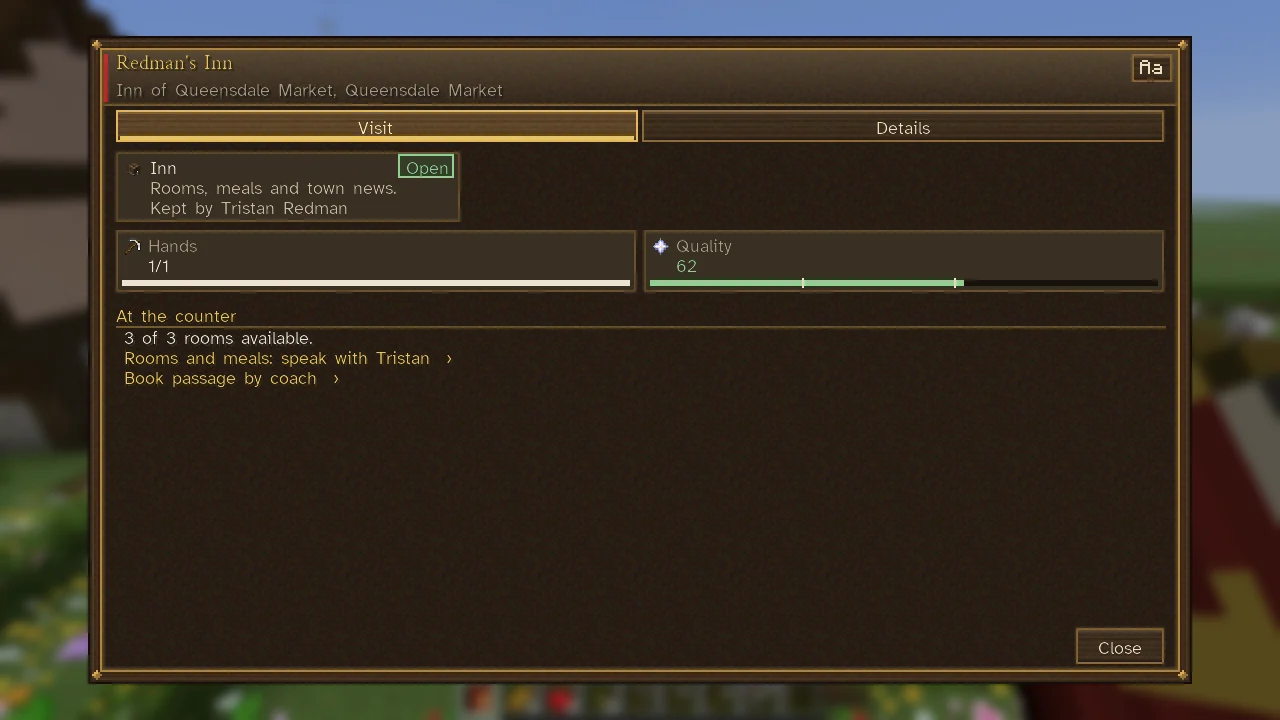
Visit is what anyone at the door sees: a card with the building's marker and kind, what it is for in a few words, who owns or keeps it, and its state on a chip: Open, Unstaffed (no one works there yet), Closed or Not ready (not in order), or for a home Lived in or Empty. Click the card for its details. Tiles follow for its Hands and Homes (how many of its places are filled) and its Quality, each on a meter. What a visitor can do there stands as chips under the service it belongs to, as an inn's Rent room, Rent week and Rent for longer… under its counter while its keeper is not in the house (gold where you can, greyed with the reason on the hover), and on the bar as well. At an inn or a market, a link to the town's newsboard follows.
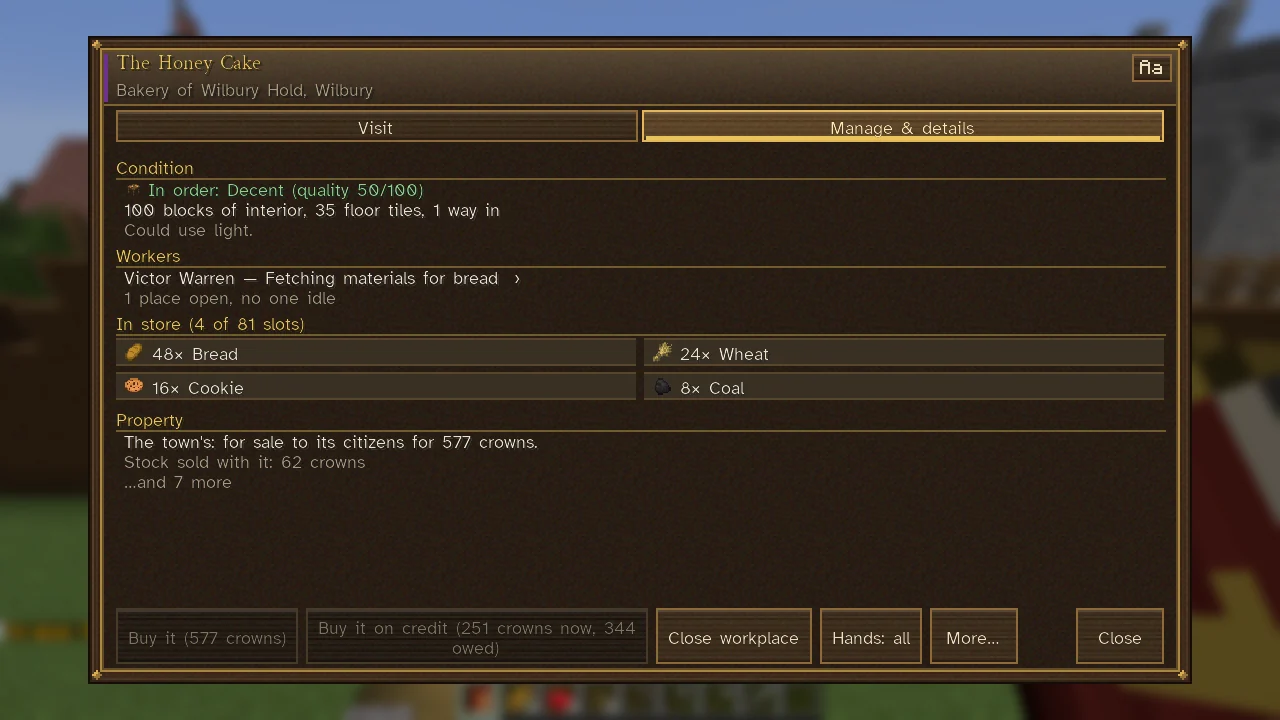
Manage & details (just Details for anyone who neither may manage the realm's buildings nor owns it) gives its condition: in order with its tier and quality, or not in order with what it lacks; what it provides (homes, quarters for soldiers, cells, places of work); its level; the size of its interior; and what it could use. Sections follow for its workers, its stores, its ownership and whatever its trade adds. Its bar holds Survey again, Show outline and Rename, with the actions of its trade.
Someone who is not of the building's realm or an ally sees into it only from within 24 blocks. From further off, a business still shows who owns it, or what the town asks for it.
Work areas
Farms, pastures, lumber camps, quarries, fisheries, salterns, sluices, mines, stables and harbours work on ground or water around the marker. Their sheets say "No work area marked" until one is set. You mark it with Surveyor's Stakes: use them on two corners, then on the marker. Farms, lumber camps, pastures and stables are given a customary area when the marker is placed, unless that would reach into another town's work or another realm's land; a quarry always needs its pit marked, and a mine's workings are laid out from its windlass on their own. A farm's fields should have water within reach, since ground is tilled only within four blocks of water. A farmstead raised from the Architect's Plans comes with its field already marked. Work areas have a largest size for each type, and must be within 64 blocks of the marker.
Who works there
Many buildings have places for workers, and idle adults in the town take up work where the town needs hands most. The building's sheet shows "Workers" and how many places are open. The trade for each building (baker, smith, forester and so on) is in the List of Building Types list; the trades themselves are in Work and Professions. You can assign work from a person's sheet, or set how many hands each trade keeps on the town's labour board, opened from the Command Table's Work tab. A building with a counter also trades: a smithy sells tools, weapons and armour, a bakery bread, and so on (Markets and Trade).
On the Command Table
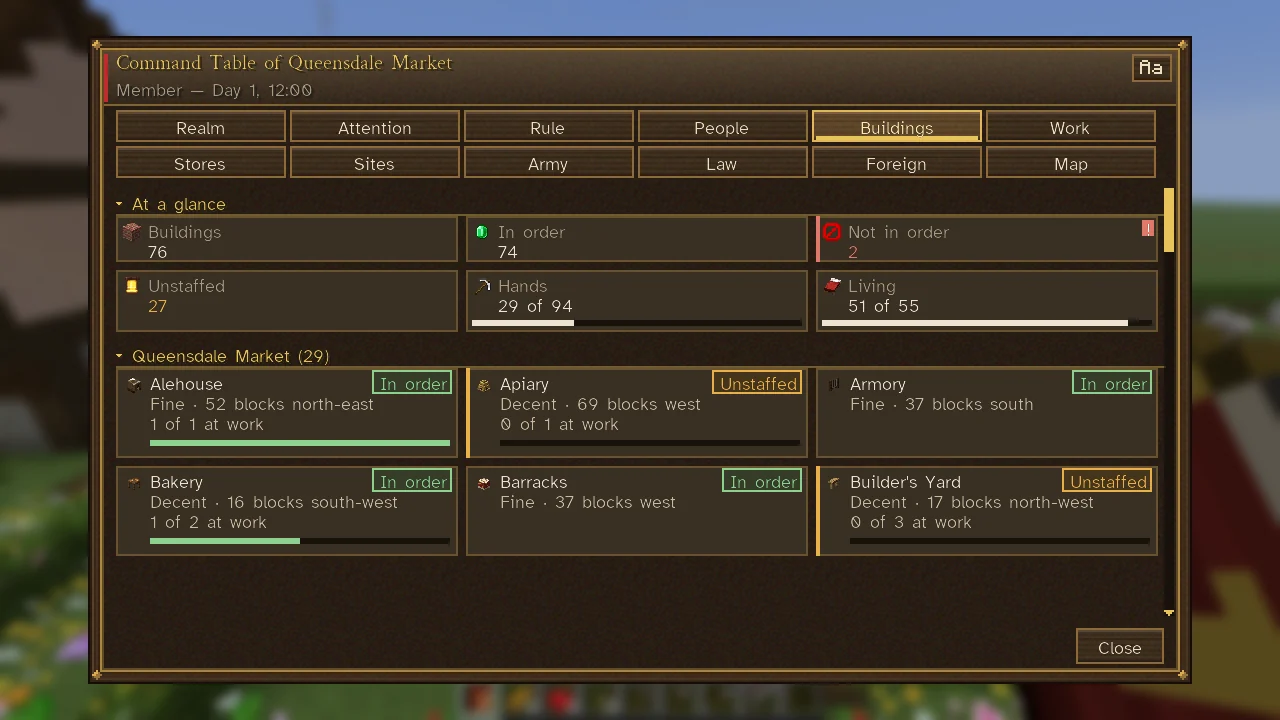
The Command Table's Buildings tab is the realm's register. It opens on six tiles: Buildings (every building with its marker), In order, Not in order (red when there are any; click it for the first), Unstaffed (workplaces with places and no one at work, in amber; click it for the first), and on meters Hands (those at work, of the places there are) and Living (those in the homes, of their beds).
Below, each town's buildings follow by kind, each a card: its marker, its name, its tier (or the first thing it wants), how far and which way it stands from the town's heart ("16 blocks south-west", "by the heart"), and how many work or live there, on a meter of its places or beds. Its state is on a chip, In order, Not in order, Unstaffed or Closed, in the colour of its meter and of a troubled card's edge. Hover it for where it stands in words and, if it is not in order, what it wants; click it for the building's sheet.
Better buildings and levels
Besides quality, some types have levels: a barracks can become a drill hall, a fencing school and a war college; a smithy a forge, an armourer's shop, a steelworks and a foundry. A building's details page shows its level ("Level I of IV: Barracks.") and the next ("Next, II Drill hall"), in amber while it still wants something; the next level's hover says what it gives and what it wants. Those who may manage the realm's buildings can then order the builders to fit it out ("Order the fitting out"), or, where the next level needs more floor, to build a room onto it ("Order a room built onto it"). The levels and their needs are in List of Building Types.
Repair and demolition
Every building built from the Architect's Plans is remembered as it was built. When blocks are knocked out of it, its sheet shows the damage and lets you order the repair (the builders put back exactly what was lost) or take it as it stands. See Construction. A ruler can slate a standing, walled building for taking down from the city view (The City View): its goods go to the stores and its people are housed elsewhere first. A building a private owner holds the deed to is theirs to keep or sell, so it must be bought first; and a Great Building is not slated for taking down.
Great Buildings and castles
The most splendid buildings, from the Royal Palace to the Waygate, are the Great Works. Walls, gatehouses, keeps and castles are described in Walls and Fortifications.
See also
- List of Building Types: every building with its marker and needs.
- Construction: having builders raise a building for you.
- Towns: how buildings make a town.
- Sheets: how a building's sheet is laid out.